30,000 points, no 3D library: how the background of this site is drawn
How the particle field behind this site is drawn in raw WebGL: one draw call, five shapes blended in a shader, and the choices that keep it accessible.
 Parsa Alizadeh
4 min read
On this page
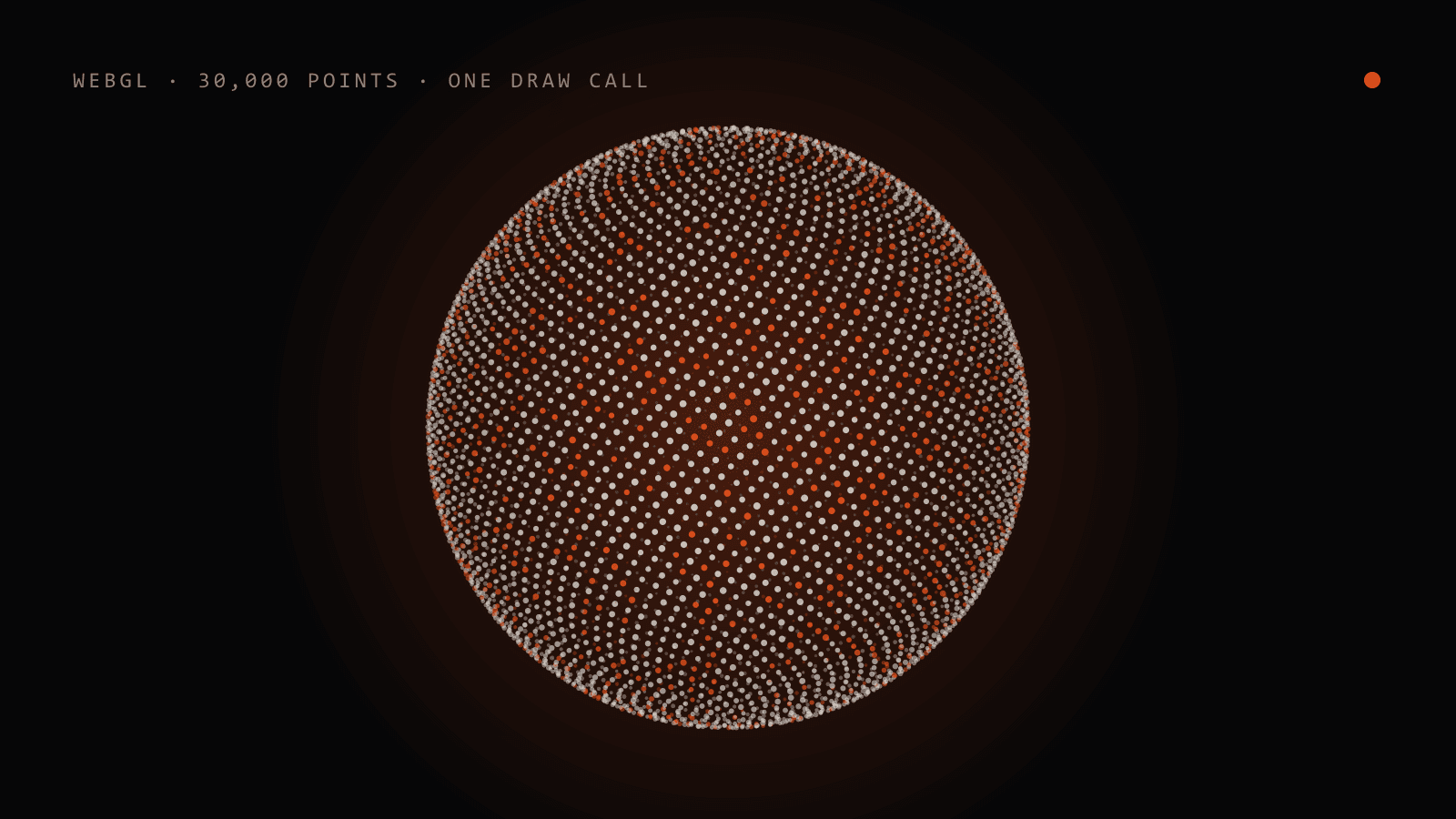
The background of this site is a cloud of points that changes shape as you scroll: a plain under a sun, a globe, a ringed core, a wireframe cube, a spiral galaxy. It looks like a job for a 3D library. It is one canvas, one shader program and one draw call, written against the browser's WebGL API directly. This post explains how it works and why I built it that way.
Why no library#
WebGL is a browser API that closely conforms to OpenGL ES 2.0 and draws into a canvas element [1]. A scene library adds cameras, meshes, materials and loaders on top of it. This background needs none of them. Everything on screen is the same primitive, a point, so the whole renderer is a list of positions and two small shaders. The earlier version of this site shipped a 3D library for a similar effect; this one removed that dependency.
The cost is that you write the projection math yourself. For points, that is a few lines.
One buffer, five shapes#
The page uses 30,000 points on desktop and 11,000 on small screens. Each point stores five positions, one per shape, as five vertex attributes, plus four random numbers. They are generated once from a seeded random function, so the cloud is identical on every visit, and uploaded once.
Sections of the page declare the shape they want with a data-scene attribute. On each frame the script reads which section is entering the window and turns that into a single number, uP, between 0 and 4. The vertex shader does the rest:
float w(float s, float k) { return max(0., 1. - abs(s - k)); }

// inside main():
float wA = w(s, 0.), wB = w(s, 1.), wC = w(s, 2.);
vec3 position = wA * aA + wB * aB + wC * aC; // …and so on for five shapes
At s = 1.4, shape 1 has weight 0.6 and shape 2 has 0.4; every other weight is zero. Moving 30,000 points from a globe to a ring costs the CPU nothing, because the CPU only changes one uniform. Each point also adds a small random offset to s, so points leave at slightly different moments and the shapes pour into each other instead of sliding.
The whole cloud is then drawn with one call to drawArrays in POINTS mode [2].
The egg problem#
The first version projected every point the usual way: divide x and y by the distance from the camera. On a wide monitor the sun, which sits far to one side, came out egg-shaped. That is correct perspective. A sphere away from the centre of a wide-angle view really does project to an ellipse. It also looks wrong.
The fix is to treat each point as an anchor plus a local offset. The anchor is where the shape sits in the scene and is projected normally. The offset, the point's position inside its shape, is projected as if the shape were on the lens axis:
float d = dAnchor - local.z;
vec2 ndc = (anchor.xy / dAnchor + local.xy / d) * vec2(2.4142 / uAspect, 2.4142);
Shapes keep their internal depth, and a ball stays round at any window width.
Light that adds up, and ink that does not#
On the dark theme the points behave like light: where they overlap, they get brighter. On the light theme that fails, because adding light to a pale background gives white on white. There, the points need to cover the paper like ink.
WebGL's blendFunc chooses how a new pixel is combined with what is already drawn [3]. One setting serves both themes if the fragment shader writes premultiplied colour:
// gl.blendFunc(gl.ONE, gl.ONE_MINUS_SRC_ALPHA)
gl_FragColor = mix(vec4(glow, 0.), vec4(ink, cover), uLight);
With alpha 0 the colour is added to the background. With alpha 1 it replaces it. Switching theme changes one uniform and the clear colour.
Keeping it polite#
A decorative canvas should never cost the reader anything.
- The canvas is hidden from assistive technology and ignores pointer events, so it never blocks a link.
- It draws inside
requestAnimationFrame, which browsers pause in background tabs [4]. - The pixel ratio is capped, so a high-density screen does not render four times the pixels for no visible gain.
- With
prefers-reduced-motionset, a preference that tells a site to minimise non-essential motion [5], the field stops animating and only changes with scroll. I wrote more about that setting in Reduced motion and accessibility. - If WebGL is unavailable, nothing is drawn and the page is unchanged. No content depends on the canvas.
When to use a library instead#
This approach fits one narrow case: many copies of one primitive, moved by a formula. As soon as a scene needs loaded models, lighting, shadows or picking objects with the mouse, a library earns its size. The lesson here is smaller: check what the effect needs before choosing the tool.
Summary#
- A point cloud needs a position buffer, two shaders and one
drawArrayscall [2]. - Storing every shape as a vertex attribute lets the shader morph between them from one uniform.
- Projecting each shape on its own axis keeps spheres round on wide screens.
- Premultiplied colour with one blend function covers both additive light and opaque ink [3].
- Pause when hidden [4], respect reduced motion [5], and keep content independent of the canvas.
Sources#
- MDN Web Docs. “WebGL: 2D and 3D graphics for the web.” https://developer.mozilla.org/en-US/docs/Web/API/WebGL_API
- MDN Web Docs. “WebGLRenderingContext: drawArrays() method.” https://developer.mozilla.org/en-US/docs/Web/API/WebGLRenderingContext/drawArrays
- MDN Web Docs. “WebGLRenderingContext: blendFunc() method.” https://developer.mozilla.org/en-US/docs/Web/API/WebGLRenderingContext/blendFunc
- MDN Web Docs. “Window: requestAnimationFrame() method.” https://developer.mozilla.org/en-US/docs/Web/API/Window/requestAnimationFrame
- MDN Web Docs. “prefers-reduced-motion.” https://developer.mozilla.org/en-US/docs/Web/CSS/@media/prefers-reduced-motion
- #web
- #webgl
- #shaders
- #animation
- #performance
Written by Parsa Alizadeh
I build web and mobile products end to end, and the AI tools that make them smarter. I care about fast interfaces, clean systems and shipping.